
suweb.ai plugin · Divi 4 & Divi 5
Turn your Divi site into a sales funnel that sells more per order
Checkout, order bumps and one-click upsells, built with Divi and WooCommerce.
Divi Funnels turns normal Divi pages into steps: a sales page, a checkout with an order bump, one-click upsells and downsells, and a thank-you page. You design every step in Divi and keep every sale, lead and number on your own site.
 Order bumpsOne-click upsellsA/B testsPrivate analytics6 templates
The problem
Sound familiar?
- Your Divi site gets visitors, but most of them leave at a plain shop page.
- Every buyer pays once and goes. There is no “add this too” moment.
- Funnel builders mean another monthly bill, another page builder and pages that live on someone else’s server.
- You can’t tell which headline or offer actually sells, so you guess.
The solution
Funnels, built in the Divi you know
Divi Funnels adds a funnel builder to WordPress. Each step is a normal page you design in the Divi Builder, with eight funnel modules for the parts that sell: checkout, order bump, upsell offer and more.
Payments run through WooCommerce, so you keep your payment methods, products and orders. Analytics, leads and A/B tests stay in your own database.
Eight Divi modules
Everything a funnel needs, as Divi modules
Drop them into any step in the Visual Builder and style them with Divi’s own spacing, colors and fonts. Works in Divi 4 and Divi 5.
Funnel Checkout
A checkout form for the products on this step.
Order Bump
A one-tick “add this too” offer above the pay button.
Upsell Offer
An after-payment offer with Accept and Decline buttons.
Opt-in Form
Collect leads with name, email or phone and optional consent.
Countdown
A timer for a real deadline, like a launch or webinar date.
Funnel Product
A product’s image, name and price, styled by Divi.
Next Step Button
Send visitors to the next step in the funnel.
Order Details
The order summary on the thank-you page.
Loads only where needed
Funnel CSS and JavaScript load only on funnel steps, so the rest of your site stays fast.
More from every order
Checkout, bumps and one-click upsells
- WooCommerce checkout on any step. Use your existing products, taxes, shipping and payment methods.
- Order bumps. One checkbox above the pay button adds a small extra, unticked until the buyer chooses it.
- One-click upsells with Stripe. After payment, buyers accept an offer and the saved card is charged without typing it again.
- Downsells. If they say no, show a lighter offer. Route accept and decline to any step.
Payments
How upsells are paid
One click depends on the payment method used at checkout:
- Stripe (WooCommerce Stripe Gateway): one click, charged as a linked order.
- Cash on delivery, bank transfer, check: one click, added to the same order.
- Other gateways (WooPayments, PayPal and more): the buyer confirms on a short payment page. You can also choose to skip upsells.
Know what works
Test it, measure it, start from a template
A/B split tests
Test any step against a copy. Each variant shows conversion, lift and confidence, and you declare the winner.
Privacy-first analytics
Visitors, conversions, revenue, AOV, bump and upsell take rates, drop-off and UTM sources. No tracking cookies, no IP addresses, and Do Not Track is respected.
Six ready-made templates
Lead Magnet, Product Launch, Tripwire, Webinar Registration, Service Booking and Ecommerce Bump + Upsell. Each one starts as a draft built in Divi.
Works with
It’s even better with our other plugins!
Divi Funnels works on its own. Add Divi Kickstart and Divi Bot Bridge and your Grok Bot can plan, build and run your funnels for you.

Divi Kickstart
Ask for a funnel in your site brief
With Divi Kickstart, your brief gets a Sales funnel question. Pick the funnel type, what it sells and the price. Your Grok Bot builds the funnel from the matching template, brands it from your brief and creates the WooCommerce products. It arrives as a draft, so you check it before it goes live.

Divi Bot Bridge
Let your Grok Bot run your funnels
Connect Divi Bot Bridge and just ask:
- “Build a product launch funnel for my sourdough starter kit at $29.”
- “Add a downsell after the upsell in my Spring Launch funnel.”
- “Start an A/B test on the sales page headline.”
- “How is my Spring Launch funnel converting this month?”
The Sales Suite bundle
Divi Funnels + Divi Kickstart (includes Divi Bot Bridge)
$138 $110 · Save 20%
How it works
Live in four steps
1
Install Divi Funnels
Install it next to WooCommerce and Divi 4 or Divi 5.
2
Pick a template
Choose from six funnels, or ask your Grok Bot to build one from your brief.
3
Design in Divi
Edit every step in the Visual Builder and set your products, bump and upsell.
4
Go live and improve
Set the funnel Live, watch the analytics and A/B test what matters.
A look inside
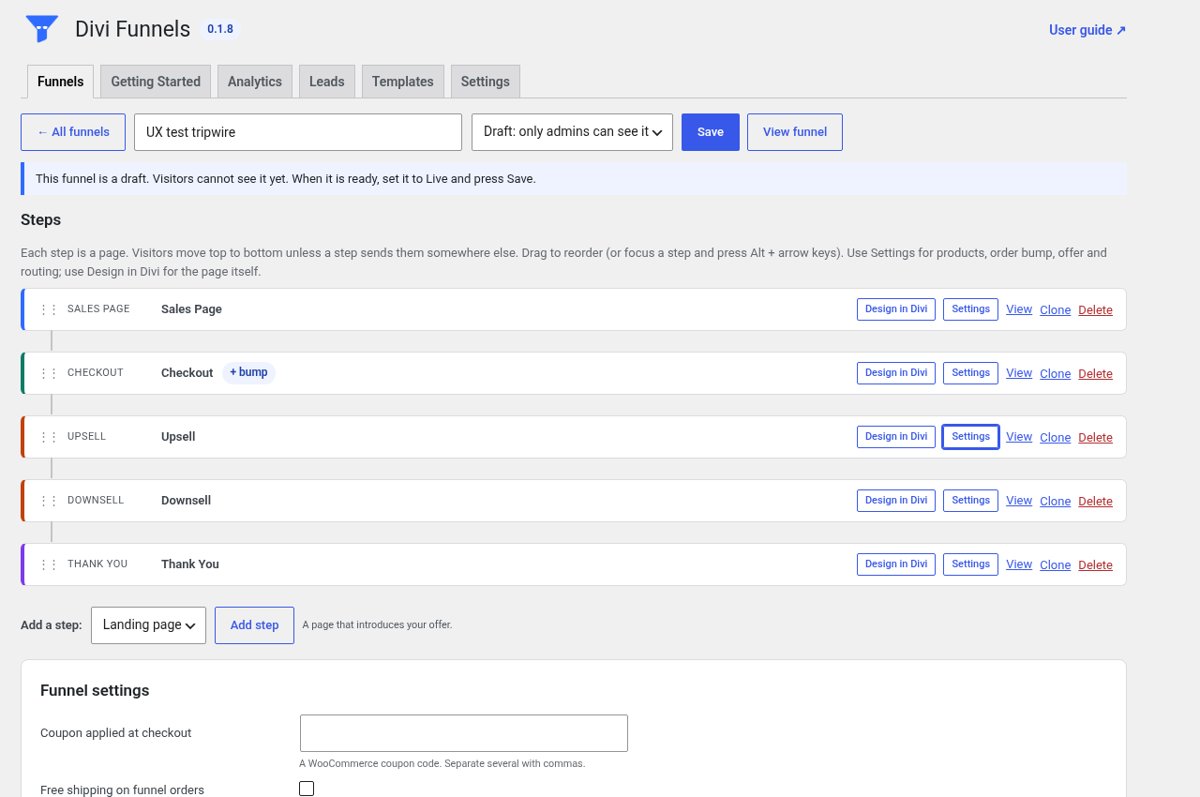
The funnel editor: every step in order, with Design in Divi, Settings and a clear draft notice.
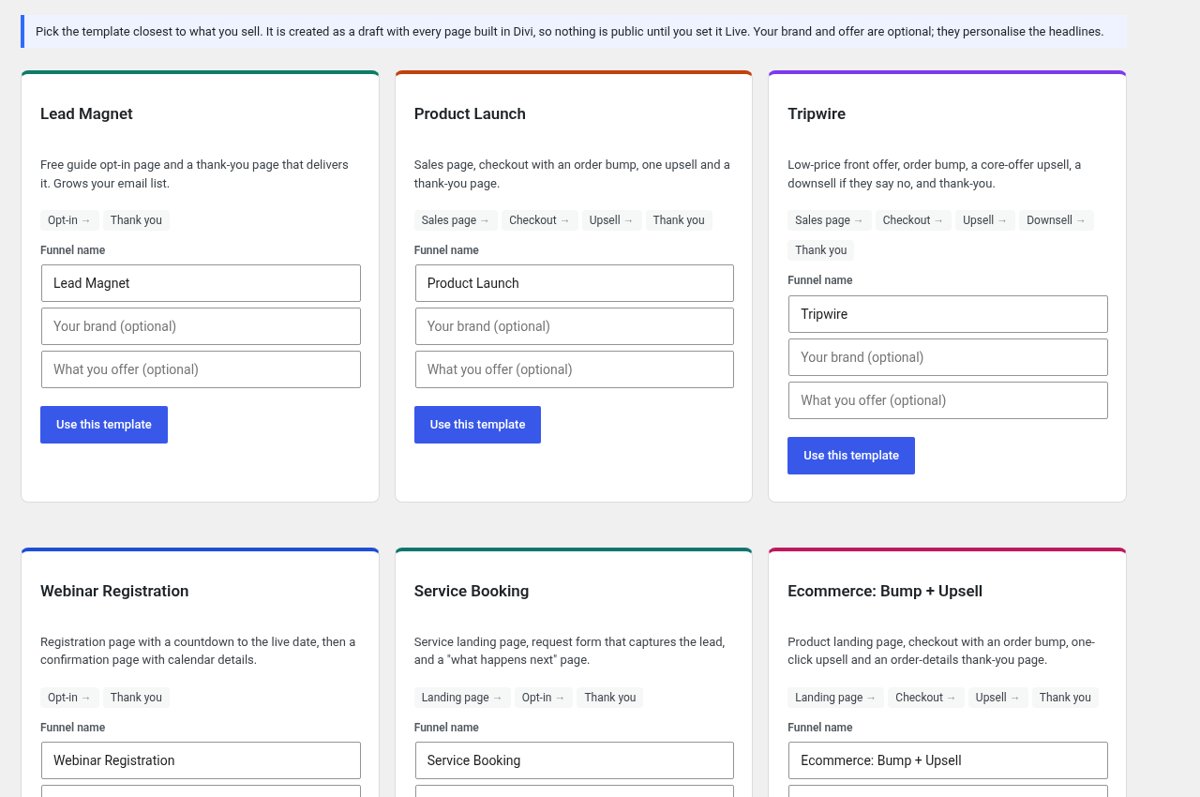
Six templates. Each is created as a draft, built in Divi, with your brand and offer filled in.
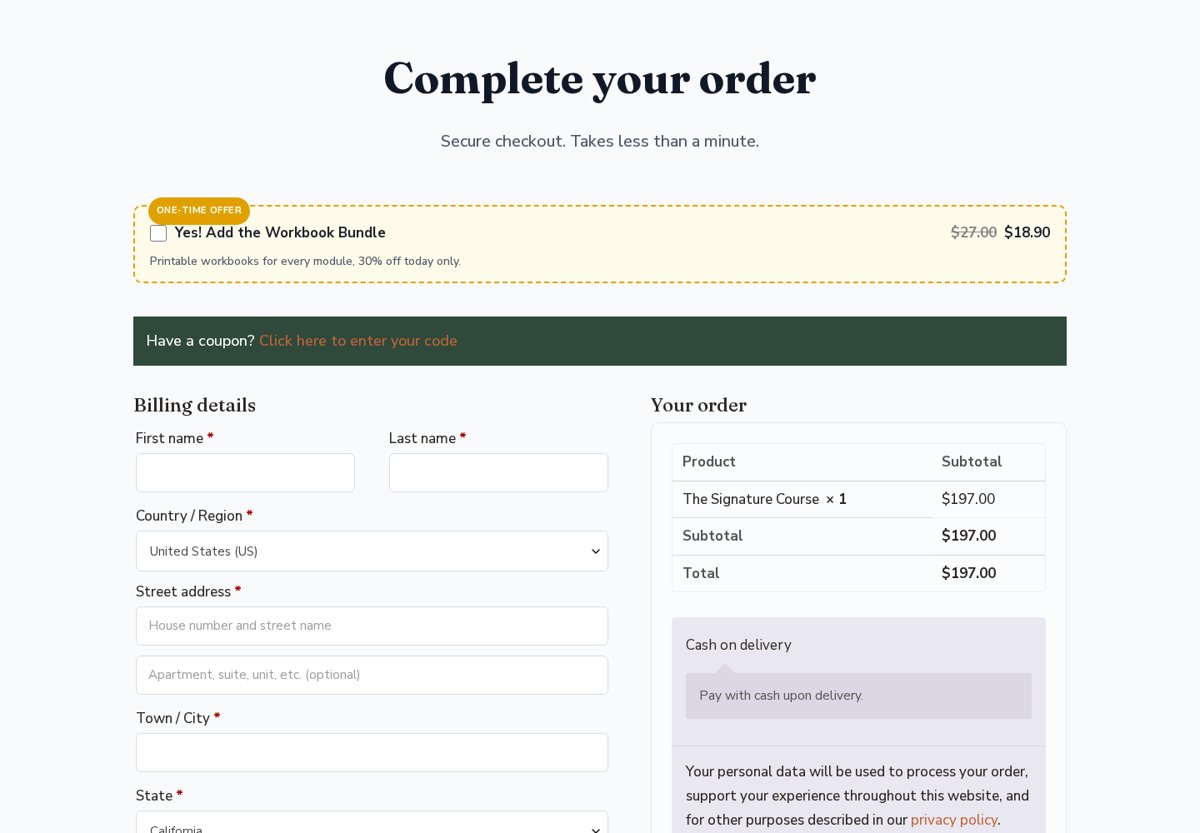
A funnel checkout with an order bump right above the billing form.
Do I need WooCommerce?
Yes. Divi Funnels uses WooCommerce for products, checkout and orders, so install WooCommerce first.
Does it work with Divi 4 and Divi 5?
Yes. The eight funnel modules work in both Divi 4 and Divi 5.
Are upsells really one click with every payment method?
No. Upsells are one click with Stripe (WooCommerce Stripe Gateway) and with cash on delivery, bank transfer and check. With other gateways, like WooPayments and PayPal, the buyer confirms the upsell on a short payment page. You can also choose to skip upsells for those gateways.
Is the order bump its own page?
No. It’s a checkbox inside the checkout step. Upsells and downsells are separate steps after payment.
Does the analytics set cookies?
No. Analytics uses no tracking cookies and stores no IP addresses. WooCommerce still uses its own cart cookies for checkout.
Where is my data?
Funnels, leads and analytics are stored in your WordPress database. Nothing is sent to suweb.ai except license checks (key, site address and plugin version).
Can I keep my normal store checkout?
Yes. Only funnels you set to replace the store checkout change it.
Can my Grok Bot build funnels for me?
Yes. With Divi Bot Bridge connected, your Grok Bot can create, edit and check funnels. With Divi Kickstart, you can ask for a funnel in your site brief.
If I cancel, does the plugin stop working?
No. Your purchase includes 1 year of updates and support. If you cancel or let it lapse, the plugin is never disabled. It keeps working on your site as long as it stays compatible with your versions of WordPress and Divi. You just stop getting new updates and support until you renew.
Get Divi Funnels
$59 for 1 site. Your license includes 1 year of updates and support. Or subscribe for automatic ongoing updates and support. If you cancel, the plugin keeps working on your site as long as it stays compatible — you just stop getting updates and support.
Six funnel templates · eight Divi modules for Divi 4 and Divi 5 · WooCommerce checkout, order bumps, upsells and downsells · A/B split tests · privacy-first analytics · lead capture with CSV export · updates and support.
1 site · 1 year of updates · covered by our 14-day refund policy for defects we can’t fix