 suweb.ai plugin · v0.1.42
Divi Kickstart
Tell your Grok Bot what you want. Get a real Divi website.
Divi Kickstart is a friendly wizard inside WordPress. You tell your Grok Bot about your business and the site you want, and it builds a small business website with native Divi modules and no custom code, so you can edit it yourself later.
 Three ways to startPlain-language briefNative Divi modulesRedesign modeEditable later
What it is
What is Divi Kickstart?
Getting a website started is often the hardest part. You know your business, but turning that into pages, layouts, and design choices can feel overwhelming. Many "instant website" tools give you something that looks fine until you try to change it.
Kickstart takes a different approach. It's a step-by-step wizard right inside your WordPress dashboard. Pick the way to start that suits you:
- "I have everything ready." Upload your files, logo, and content, and your Grok Bot takes it from there.
- "Walk me through it." Answer simple questions about your business, contact details, the pages you need, the look you like, your photos and files, sites you admire, and your design preferences.
- "Redesign my current website." Enter your current site's address. Choose "Just do it" to keep your content, logo, and colors with a fresh, modern design. Or choose "I want some input" to pick what changes. For each part you can say "Here's the new one" or "You pick for me," and you can share sites you like.
Kickstart can reuse text, photos, your logo, and your colors and fonts from an existing website. Once your brief is ready, your Grok Bot builds the site with real Divi modules. There's no custom code, so the finished site stays fully editable by you or any Divi designer.
Your progress saves as you go, so you can stop and come back. Your brief stays private on your own site, and nothing is sent off-site.
Kickstart is designed for small business informational websites, such as a local service, a trade, a studio, a practice, or a shop's information pages.
The problems it solves
Sound familiar?
- Not knowing where to start with a new website.
- Old websites that look dated, where the content is still good.
- "AI websites" you can't edit afterwards.
- Long back-and-forth gathering content, logos, and preferences from clients.
- Losing your place in a long setup process.
What it does
Key features
Three ways to start
Ready to go, guided, or redesign. Pick whichever suits you.
Guided questions in plain language
Business, contact, pages, look, photos and files, sites you like, and design.
Redesign without starting over
Keep your content, logo, and colors and get a modern design. Or choose exactly what changes.
"You pick for me" when you're not sure
Let your Grok Bot make sensible choices where you don't have a preference.
Reuse what you already have
Text, photos, logo, colors, and fonts from your existing website.
Real Divi modules, no custom code
The site is fully editable by you or any designer.
Saves your progress
Stop any time and pick up where you left off.
Private brief
Your answers stay on your site, and nothing is sent off-site.
Bridge included
Your Grok Bot has everything it needs to build in Divi.
Who needs it
Who it's for
- Small business owners who want a professional website without learning a page builder.
- Freelancers who want a faster first draft for clients, built in Divi they can refine.
- Agencies that want a consistent way to collect client briefs and get sites started.
- Divi designers who'd rather start from a solid, editable base than a blank page.
Real examples
How people use it
- New business, first website. A café owner chooses "Walk me through it," answers the questions, adds photos, and points to two sites she likes. Her Grok Bot builds the pages in Divi.
- Tired old site. A plumber's ten-year-old website still has the right services and phone number. He picks "Redesign my current website," then "Just do it," and gets a modern design with his content and branding kept.
- Partial refresh. A studio owner wants new colors but likes her logo. She chooses "I want some input," keeps her logo, says "Here's the new one" for colors, and "You pick for me" for fonts.
- Freelancer intake. A freelancer sends new clients through the wizard to collect their brief, then refines the Divi site their Grok Bot builds.
- Everything ready. A consultant already has copy, a logo, and photos, so she uploads them with "I have everything ready."
How it works
Up and running in four steps
1
Install Kickstart
Install Kickstart and Bridge, which comes with it.
2
Pick how to start
Choose “I have everything ready,” “Walk me through it,” or “Redesign my current website.”
3
Fill in your brief
Answer plain-language questions. Your progress saves as you go, so you can stop and come back.
4
Your Grok Bot builds it
Tell your Grok Bot the brief is ready. It builds the pages with real Divi modules that you can edit later.
What it works with
Requirements
Version 0.1.42. Works with your own Grok Bot. No custom code is added to your site.
| Divi | Built for the Divi theme. Your Grok Bot builds with native Divi modules through Bridge, which is included. |
|---|---|
| WordPress | 5.6 or newer |
| PHP | 7.4 or newer |
| Grok Bot | Your own Grok Bot builds the site from your brief. |
| Hosting | Standard WordPress hosting. Your brief, logo and photos stay on your own site. Make sure your upload size limit fits your photos. |
A look inside
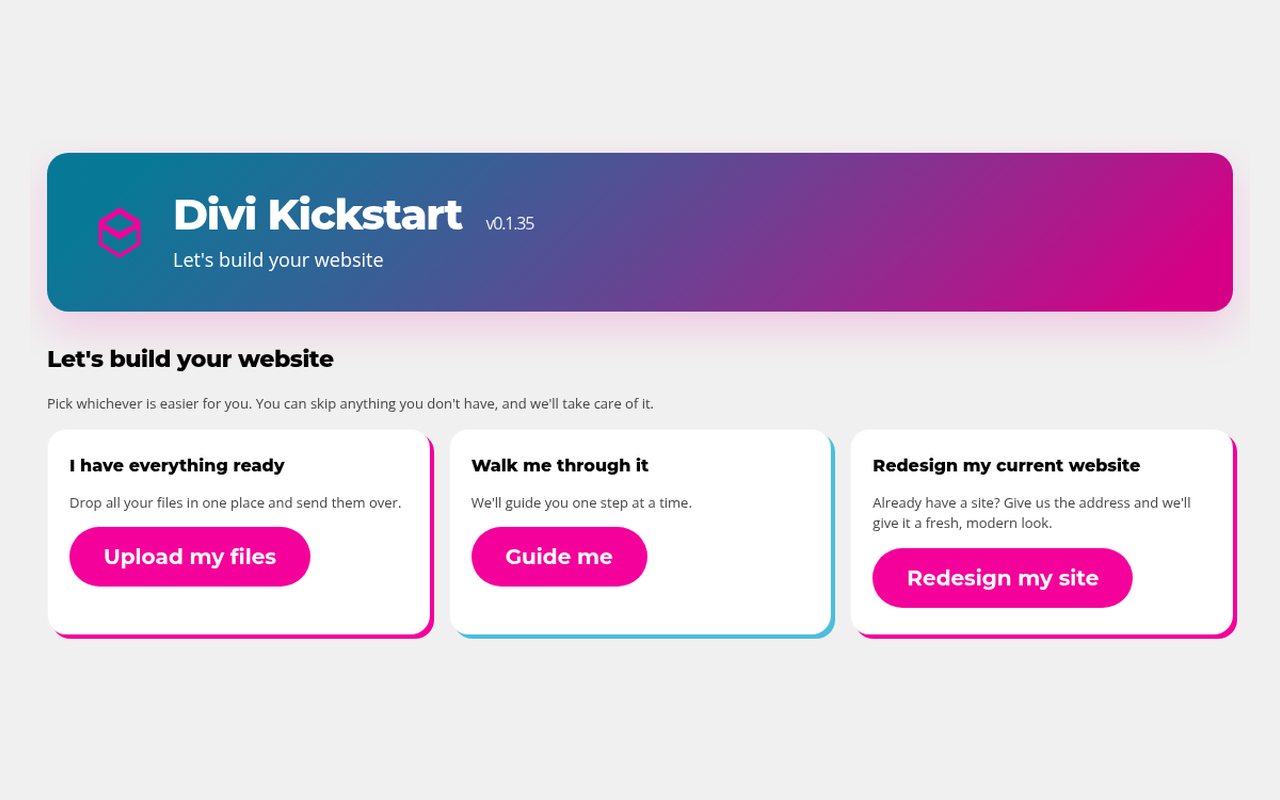
Pick how you want to start: upload everything, get guided step by step, or redesign your current site.
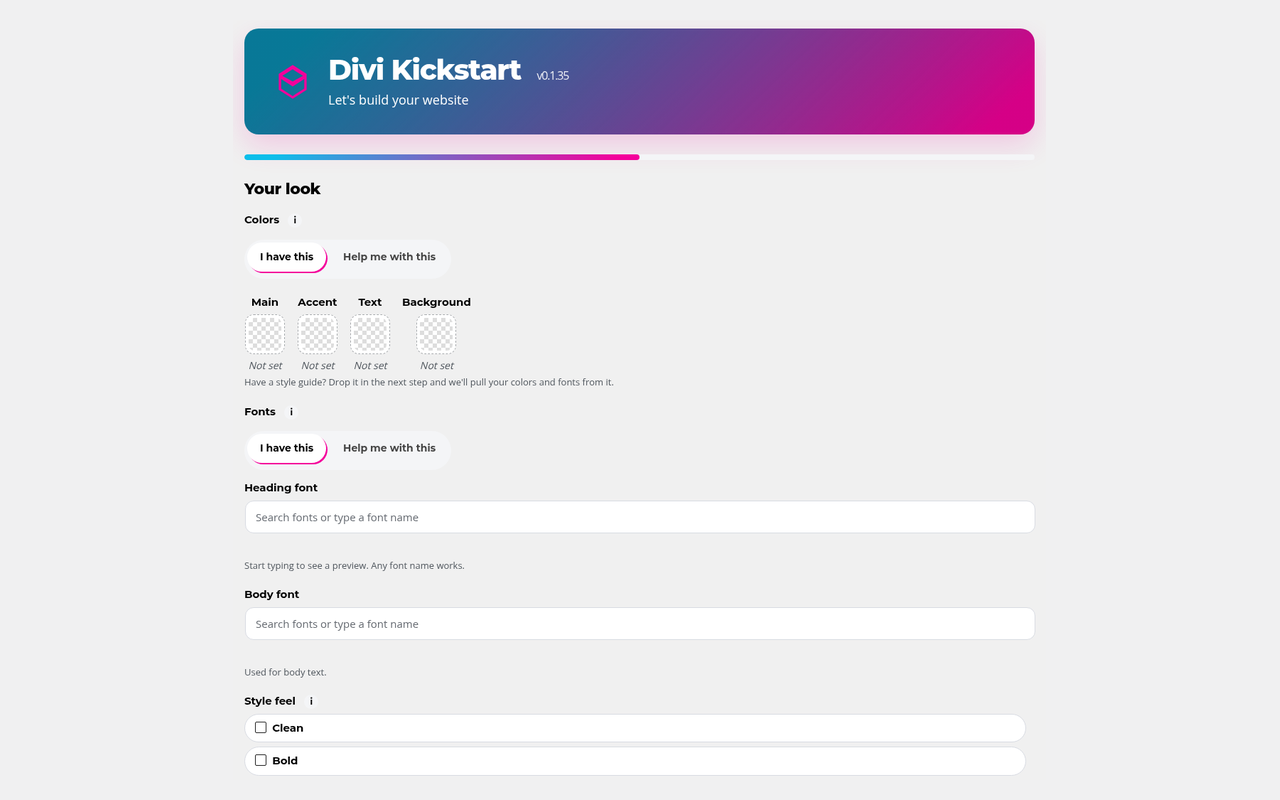
The “Your look” step: choose colors, heading and body fonts, and a style feel, or let us pick.
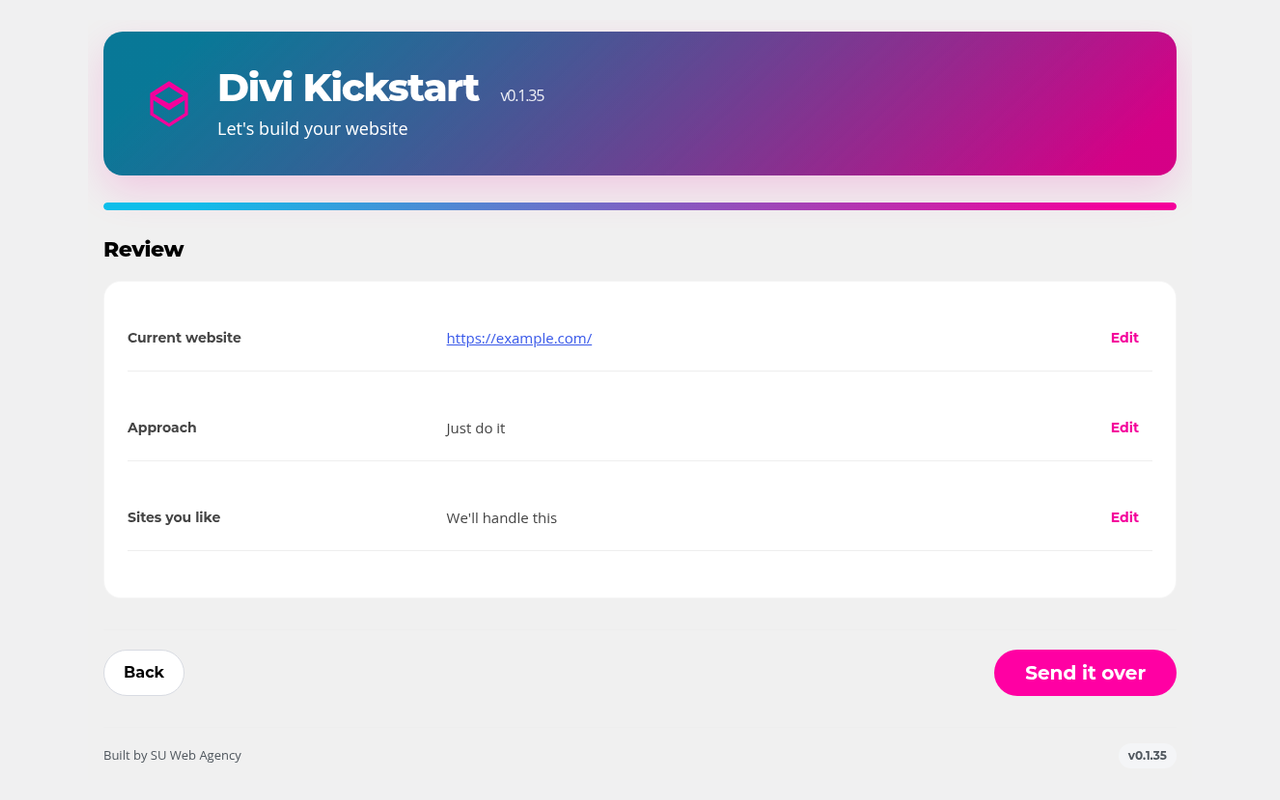
Review your brief, edit any answer, then send it over.
What kind of websites can Kickstart build?
Small business informational websites, the kind that explain who you are, what you offer, and how to get in touch.
Can it build an online store?
Kickstart is designed for informational websites. It isn't built for online stores.
Can I edit the site afterwards?
Yes. It's built with normal Divi modules and no custom code, so you can change anything in the Divi Builder, or hand it to any Divi designer.
I already have a website. Do I have to start from scratch?
No. Choose "Redesign my current website" and Kickstart can reuse your text, photos, logo, colors, and fonts.
What if I don't know what I want?
Choose "Walk me through it," and use "You pick for me" wherever you're unsure.
Is my information private?
Yes. Your brief stays on your own site, and nothing is sent off-site.
Can I stop halfway?
Yes. Kickstart saves your progress so you can come back later.
Do I need Divi Bot Bridge too?
It's included. Bridge comes free with Kickstart.
Get Divi Kickstart
From $79/year for 1 site, $139 for 5 sites, $209 for unlimited sites. Divi Bot Bridge is included. Billed yearly.
SUWEB Bundle Get all four plugins for $149/yr
All four separately cost $216/yr, so you save $67. On 5 sites you save $127, on unlimited $207. Divi Bot Bridge included.
Works even better together

Divi Bot Bridge
Unlock Divi for your Grok Bot.

Divi Box & Ship
Pack up your best Divi work and ship it to any site.

Divi Brand Swap
Rebrand your whole Divi site in one go, with one-click undo.