A Grok Bot is a genuinely useful helper for running a website. Ask it to change a phone number, add a page or tidy up your fonts, and it gets to work. But on a Divi site there has always been a catch: most of what makes Divi Divi is out of the bot’s reach. Divi Bot Bridge fixes that, and it changes how Divi work gets done.
The problem: WordPress alone can’t reach most of Divi
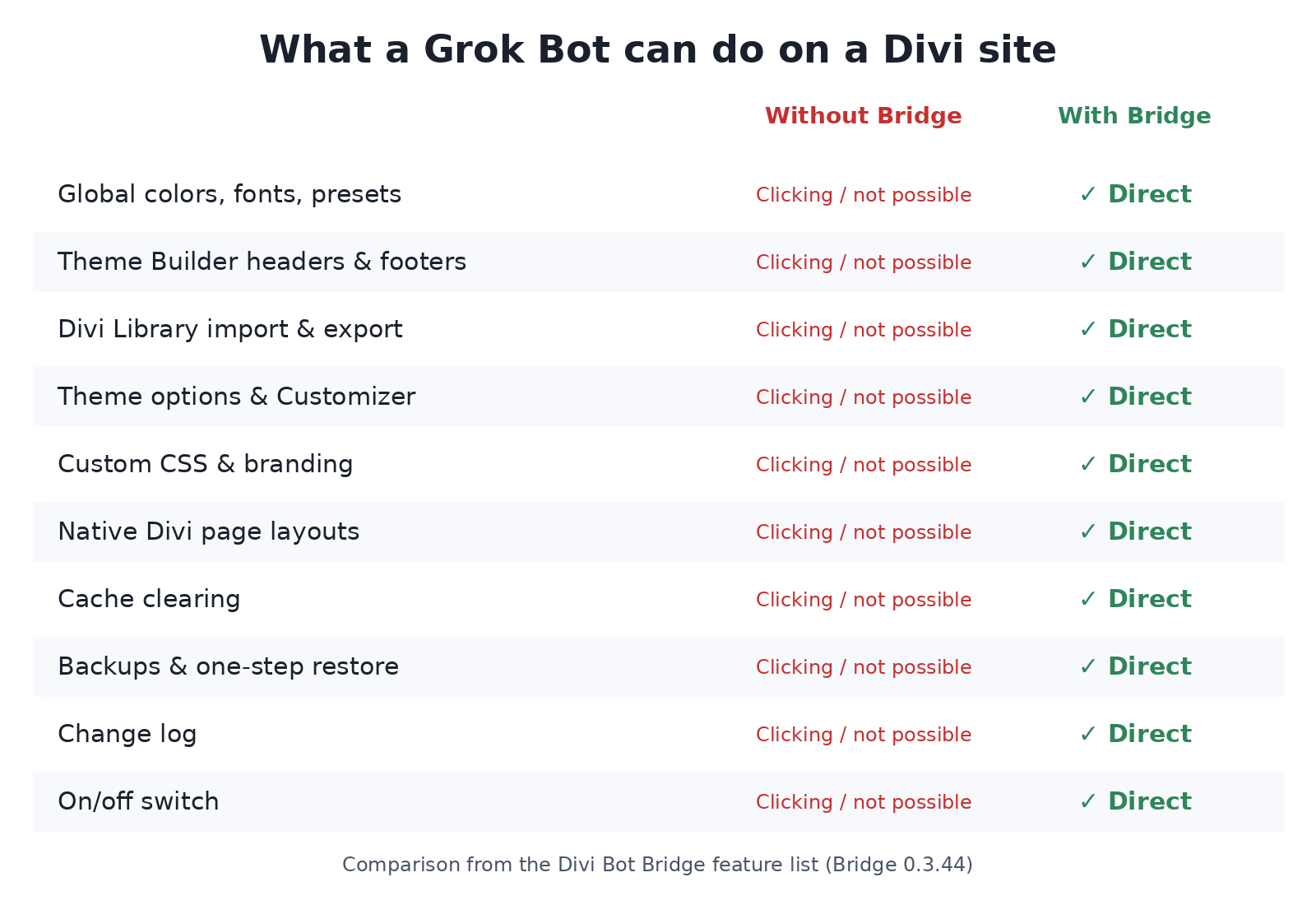
The standard WordPress REST API handles posts and pages. That’s it. Global colors and fonts, presets, the Theme Builder, the Divi Library, theme options and custom CSS all sit outside it.
So without Bridge, a Grok Bot has two choices: skip the job, or log in and click around the screen like a person. Screen clicking works, sort of. It’s slow, it costs credits for every retry, and one moved button can break it.
What Divi Bot Bridge is
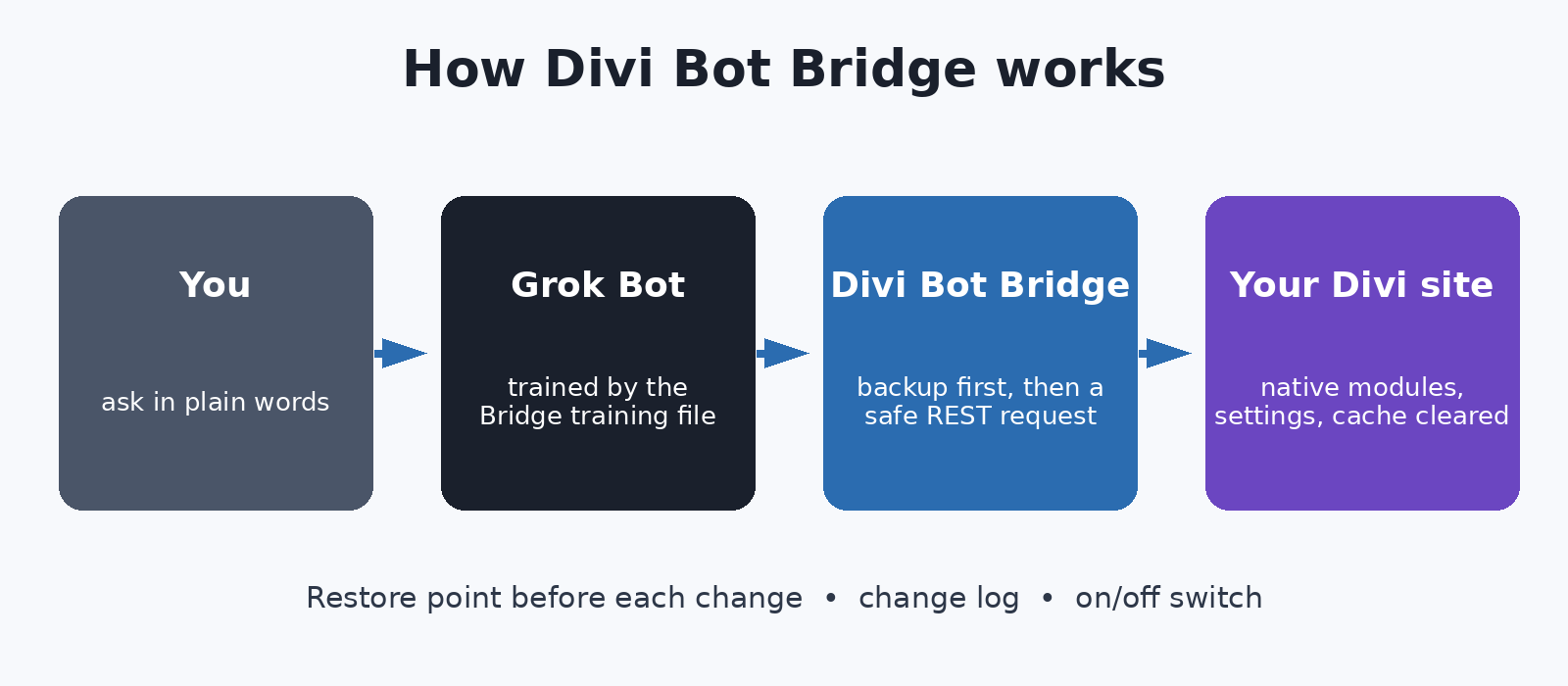
Divi Bot Bridge is a small WordPress plugin that gives your own Grok Bot safe, direct access to Divi. Instead of clicking, your bot sends clean, structured requests, and Bridge makes the change through Divi’s own settings and native modules.
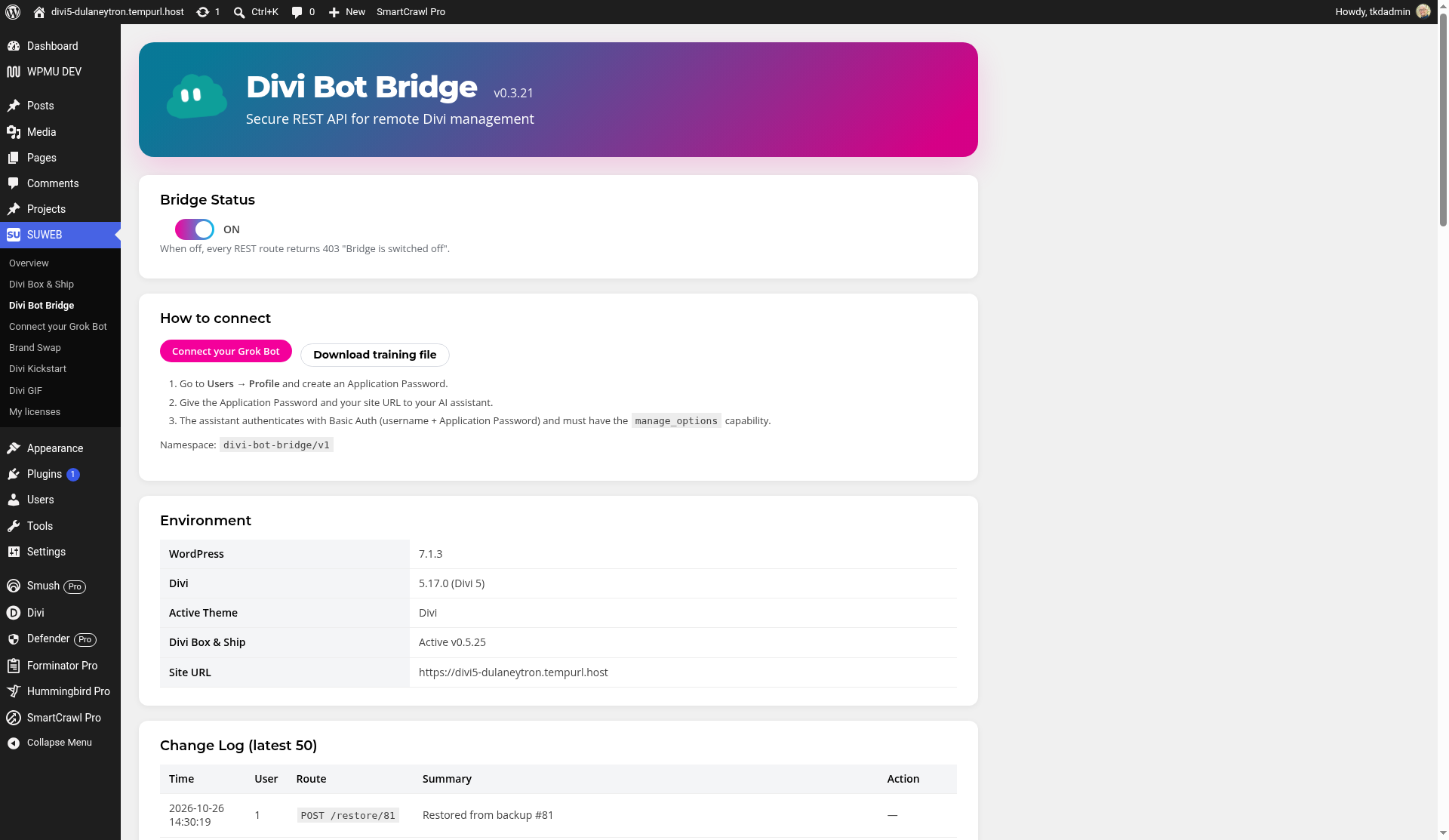
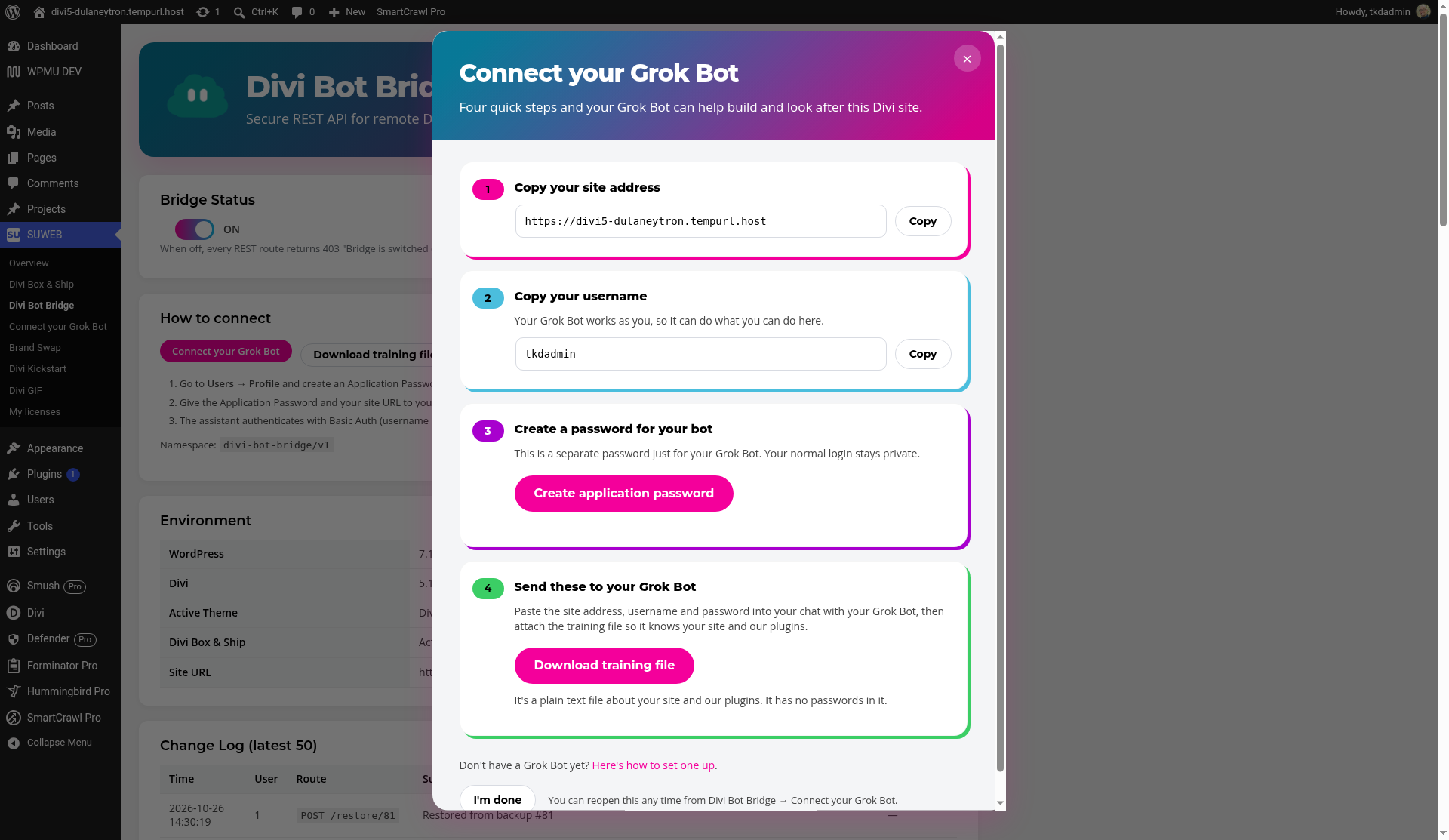
It also ships with a training file you download from the Bridge screen. Hand it to your Grok Bot once and it learns every route, every rule and how Divi 4 and Divi 5 differ. No custom AI code is added to your site, and nothing is locked into a proprietary platform. Your site stays a normal Divi site that any designer can edit.
What your Grok Bot can do with Bridge
As of Bridge 1.0, your bot can:
- Read and save real Divi page layouts on pages and posts, in Divi 4 and Divi 5, using native modules.
- Manage the Theme Builder: create and assign headers, footers and templates in one step.
- Work with the Divi Library: save, import and export layouts.
- Update presets so every module that shares a style changes together.
- Change global colors and fonts site-wide, plus Divi 5 design variables.
- Edit theme options, Customizer settings and custom CSS, backed up first.
- Update branding: logo, site icon, name and tagline.
- Change a page’s status or move it to the trash, with a restore point taken first. Trash is the default; permanent deletion only happens when you ask for it.
- Clear the cache so changes show up right away.
- Check site status and health: Divi version, installed plugins, and whether pages still load after a change.
The safety net is built in
Giving a bot access to your site should never feel like a gamble. Bridge takes a backup before it changes or removes anything, keeps a change log of the latest 500 changes with a Restore button, and lets your bot roll back to any restore point in one step.
There’s also an on/off switch. Flip it off and your Grok Bot can’t read or change anything through Bridge until you turn it back on. Your bot connects with its own application password, so your normal login stays private and you can revoke access any time.
Every release is tested on both a Divi 4 and a Divi 5 test site.
Grok Bot: the perfect design companion, once it has proper access
A Grok Bot already knows a lot about design: layout, spacing, color, copy, what makes a page easy to read on a phone. What it has been missing on Divi sites is proper access. Bridge gives it safe, full access to Divi, and that turns it from an advisor into a real design companion.
- Backups first, every time. Your bot takes a restore point before it touches anything, so trying an idea is never risky.
- Native Divi, not custom code. It builds with Divi’s own modules, presets and global styles, so everything stays editable in the visual builder.
- Works while you sleep. Hand it a list of tweaks at night: new pages as drafts, font and color tidy-ups, checks across your pages. Review in the morning and keep what you like.
- Respects your design. Because it works through your global colors, fonts and presets, its changes match the rest of your site.
What you can’t do without it
Here’s the honest comparison. Without Bridge, a Grok Bot on a Divi site:
- Can’t reach global colors, fonts or presets through WordPress at all.
- Has to open the visual builder and click to edit Theme Builder headers and footers.
- Sees Divi layouts as raw text, which is easy to break.
- Has no automatic backup, no one-step undo and no change log.
- Has no kill switch short of changing passwords or deleting users.
With Bridge, all of that becomes a direct request with a backup behind it.
The time savings
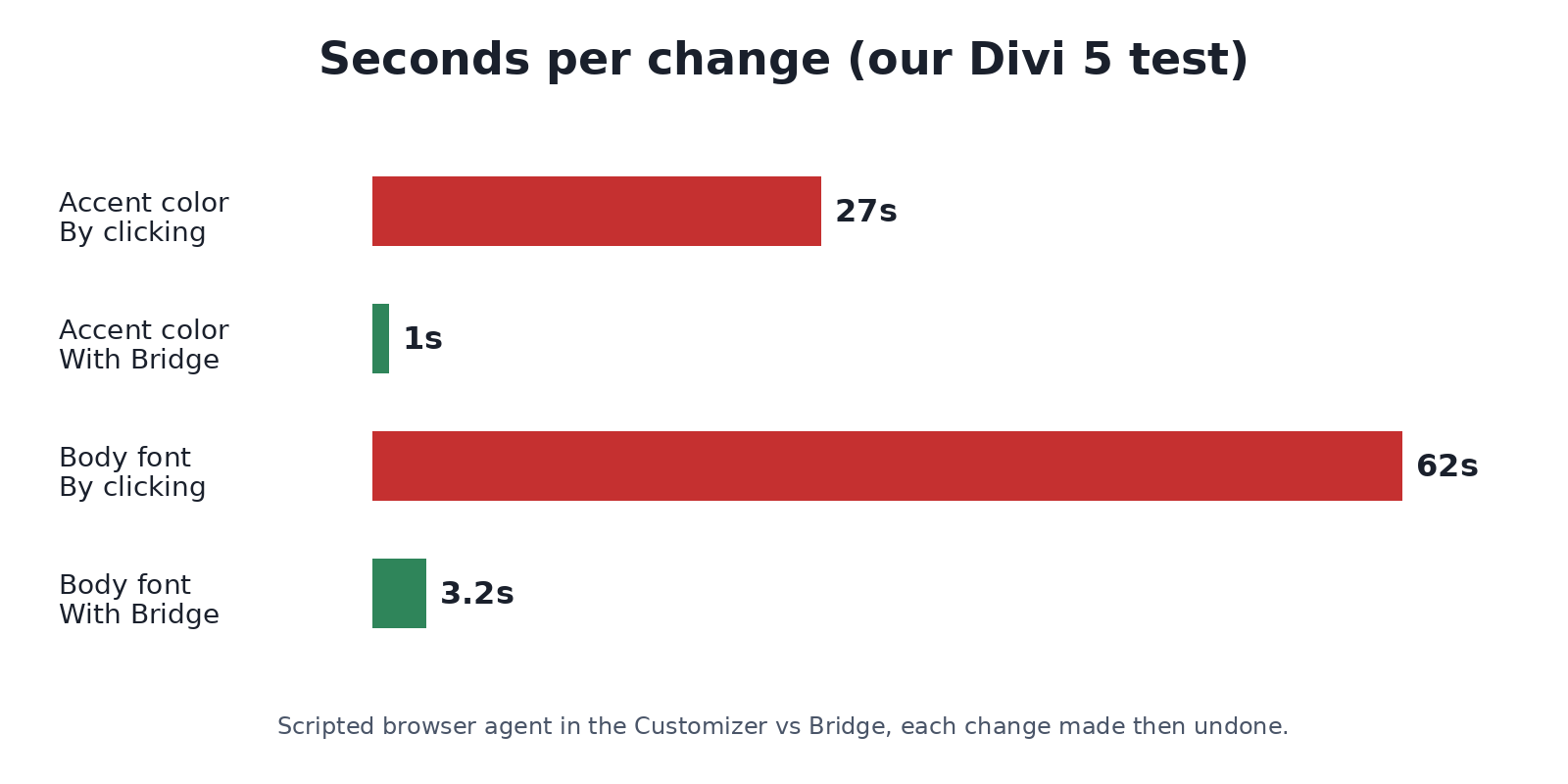
We measured this on a Divi 5 test site, using a scripted browser agent in the Customizer against the same change made through Bridge:
- Changing the accent color: about 27 seconds and roughly 14 clicks by screen, 1.0 second with Bridge.
- Changing the body font: 62 seconds by screen, 3.2 seconds with Bridge.
That’s up to 20x faster on Divi settings in our tests. Your results will depend on the job, but the pattern holds: clicking is slow, direct requests are fast.
Real work tells the same story. We use Bridge every day on the roughly 70 websites we manage. When we moved the Five County Association of Governments site from Divi 4 to Divi 5, Bridge let our Grok Bot check and fix the details a migration leaves behind (line breaks, global colors, header height, image sizing) directly through Divi’s settings, with a restore point before each change, instead of clicking through page after page.
Privacy-friendly by design
Your content stays between your site and your Grok Bot. Licensing only sends your license key, your site’s address and the plugin version to suweb.ai. Nothing else, and none of your content.
Get started free with the Divi Bot template
The Divi Bot template (opens in a new tab) is free for anyone. It sets up a Grok Bot ready for Divi work and walks you through connecting your site. Bridge is the piece that unlocks Divi for it.
Connecting takes four quick steps: install Bridge, copy your site address and username, create an application password for your bot, and send those to your Grok Bot with the training file.
Unlock Divi for your Grok Bot
Divi Bot Bridge starts at $29, which includes 1 year of updates and support. If you ever cancel, the plugin keeps working; you just stop getting updates. Bridge is also included with every other SUWEB plugin license.
If you run a Divi site and use a Grok Bot, or you’re thinking about it, Bridge is the difference between a bot that clicks around and one that actually knows Divi.
Or start with the free Divi Bot template → (opens in a new tab)